Source
Get the installer from HP Support via our download page.

Trust & security
Trust & security
This page gathers the integrity checks, CVE context, and antivirus clarification for Windows build 9.46.17.0. Prefer a signed installer from HP Support, then match the hashes below.
Before install
Do these in order. Skipping the hash check is the most common integrity miss.
Get the installer from HP Support via our download page.
Confirm HP_Support_Assistant_V9.46.17.0.exe · 184.22 MB · 15 Sep 2025.
Compare SHA-256 locally before you double-click the exe.
Prefer 9.46.17.0+ if an older build is covered by HPSBGN04031.
Integrity
Match these values against the file on disk after download.
9e4ef56f4f68f43ff8e8a45d4ed2f8843aea1b5025e9c23f4d9f8ef357fa8119
2a9631b0342651bc524b105234a61c76a5418e0a
Prefer SHA-256. PowerShell: Get-FileHash .\\HP_Support_Assistant_V9.46.17.0.exe -Algorithm SHA256
Advisory context
Stay on a current package if your install is covered by HP security bulletin HPSBGN04031.
Action
If you are still on an earlier build referenced by HPSBGN04031, install the current Windows package, verify the hash, then reopen HP Support Assistant.
Security bulletins describe issues that can affect older Support Assistant builds. Moving to the published package is the practical fix path for most users.
We surface the version, size, date, and hashes so you can confirm the file you downloaded. We do not host the binary ourselves.
Scanner reports
Published third-party listings for this Windows installer have reported Clean (100/100). Treat that as a supporting signal, not a substitute for hashing.
Public package pages associated with 9.46.17.0 have shown a clean multi-engine scan result for the installer.
Scanner dashboards can lag or mirror the wrong file. SHA-256 on your disk is the ground truth for this build.
Prefer HP’s download surface. Avoid random reuploads that claim the same version without matching hashes.
False positives
Heuristic detections can appear while HP Support Assistant installs certain driver packages. Confirm the toolkit installer first, then decide how to handle temporary files.
Microsoft Defender heuristics such as Trojan:Win32/Sonbokli.A!cl have been discussed in HP Support community threads during some Intel driver installs.
Separate reports mention AVG flagging temporary PowerShell helpers (for example IDP.ALEXA.53) during install. Other engines often stayed clean.
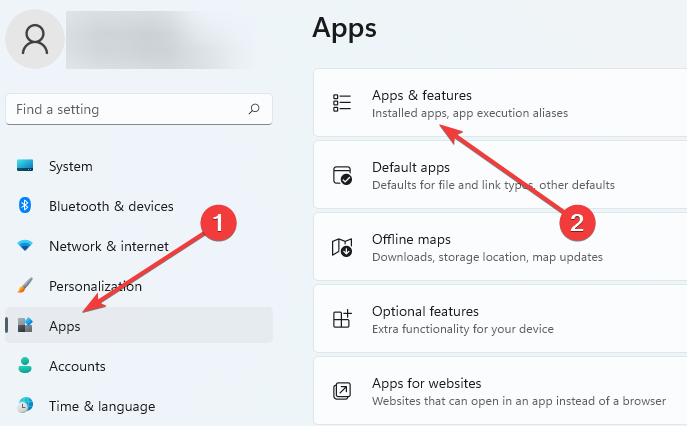
Verify SHA-256 of the Support Assistant exe. Do not restore unsigned drops from unknown folders. If installs stall, reset or uninstall from Windows Apps and reinstall.
Recovery
Reset or uninstall HP Support Assistant, restart, then install 9.46.17.0 again from the download page.
About this site
hpsupportassistant.co explains the Windows utility and points you to vendor download and integrity details.
Version facts, SHA hashes, system requirements, feature summaries, and troubleshooting paths based on published package data and HP documentation themes.
Not HP Development Company, not an official HP Support portal, and not a host for the installer binary. Product names belong to their owners.
Privacy notes for this website live on the privacy policy page.
Open the download page, fetch the Windows package from HP Support, then confirm SHA-256 before you run it.